See It in Action
The same checkout screen you'll use at the counter — no separate demo, no different app.
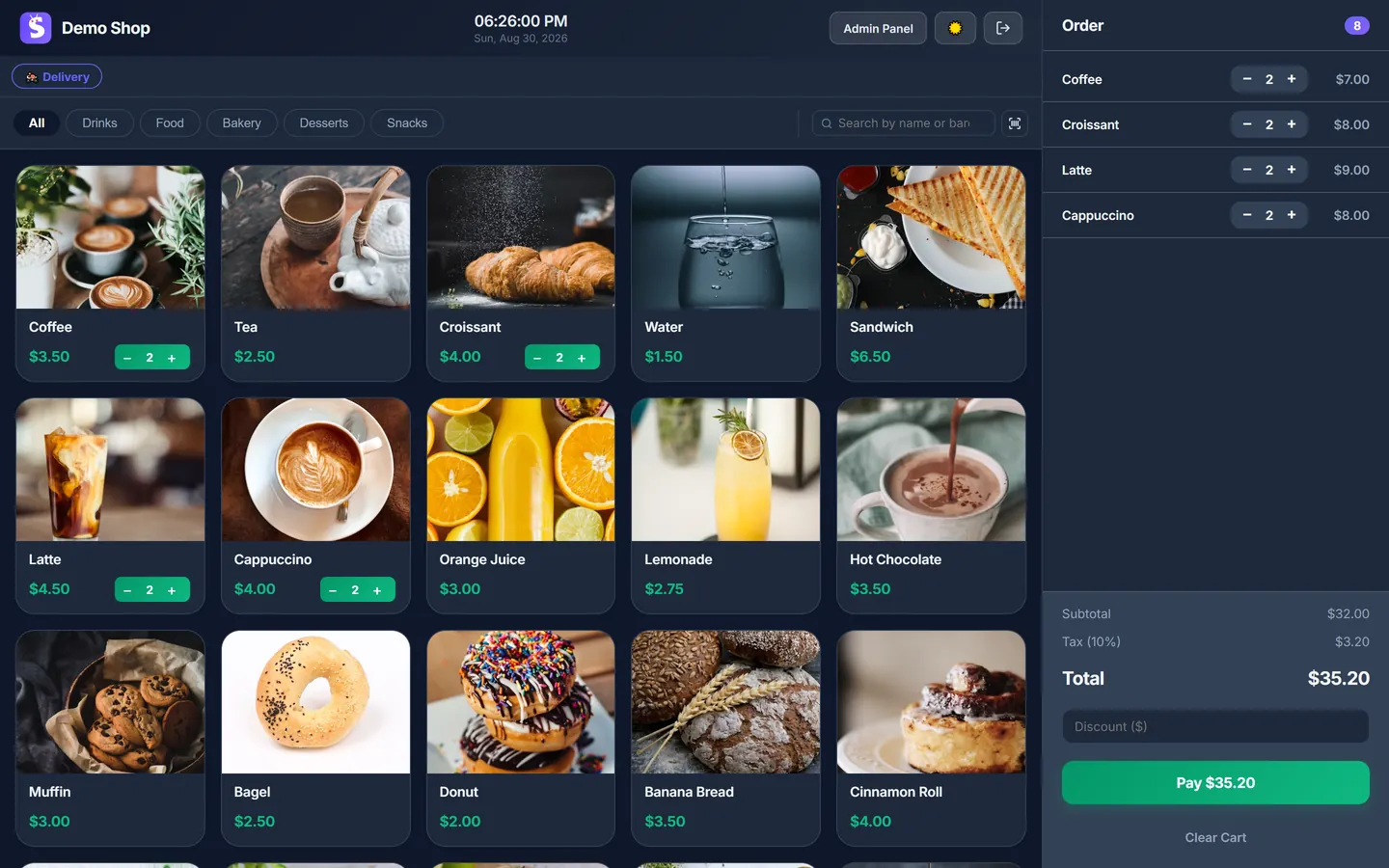
The real Sicada checkout — add items, take cash or card, done.
Take orders in seconds, record cash and card payments, manage your menu, and see your daily takings — all from one simple screen. Free to start.
Free forever · No credit card · No trial
The same checkout screen you'll use at the counter — no separate demo, no different app.
The real Sicada checkout — add items, take cash or card, done.
Sicada is a free, web-based café POS built for counter service — quick taps, a clear menu, and a checkout that keeps up during the morning rush. New to POS? See how it compares to a cash register. Weighing a full restaurant platform? See Sicada vs Toast.
Tap the coffee, tap the pastry, take payment, done. Big buttons, one screen, nothing between the tap and the next customer. Sicada is built to move at rush-hour speed.
Group items into Coffee, Tea, Food, Pastries and Specials, each with a photo. Add a seasonal drink or change a price in a few seconds. Your whole menu is on the Free plan.
Open a tab for a table, keep adding rounds through the visit, and settle one bill at the end. The Free plan covers up to 5 tables; Pro raises that to 20.
Put a QR code on each table or at the counter. Guests scan it, browse your menu with photos, and send their order straight to your POS — no app to download. Available on the Pro plan.
Different from the table QR code: share one menu link — in your bio or on your Google listing — so customers can order a delivery from their phone. The order lands in Sicada as a real sale. See how online ordering works. Available on the Pro plan.
Take cash with automatic change, or mark an order paid by card. Today, your own terminal processes the card and Sicada records it against the sale; built-in card processing is on our roadmap, not available yet.
Print to any printer through your browser, or just keep the receipt on screen — a printer isn't required. Either way you keep a clean record of every sale, with your café's name and tax details.
Cash up against the day's total and the full list of sales — free. The Pro plan adds the analytics dashboard: your top items, revenue trends and best and worst sellers over any date range.
If your connection drops mid-service, checkout keeps going. Sicada saves every sale on the device and syncs it automatically the moment you're back online.
The Free plan is one user. Pro adds up to 5 staff accounts, each with their own login, so you can see who rang up what across a shift.
Opening. You unlock the door and open Sicada in the browser on the counter tablet. Yesterday's numbers are already there — no login dance, no sync wait.
The rush. Orders come fast. Tap the flat white, tap the almond croissant, take the cash, hit done. A regular pays by card on your terminal; you mark the order paid by card and Sicada logs it against the sale.
A table sits down. Two people take the window table. You open a tab, add their coffees, and add a second round twenty minutes later. When they're ready to leave, it's one bill.
A table orders itself. On Pro, another group scans the QR code on their table, browses the menu with photos, and sends the order straight to your POS. You just make it.
An order for delivery. On Pro, a delivery order comes in through your menu link. You pick a zone or a flat fee, assign one of your drivers, and move it through Preparing, Out for Delivery and Delivered like any other order. See how delivery works.
The wifi blips. The router drops for a few minutes at 11:40. Checkout doesn't stop — Sicada holds every sale on the device and syncs them once the connection is back.
Closing. Before you cash up you open the day's takings: the total and every sale. It runs the same on a phone, an iPad or a laptop, so whatever is on your counter works.
The Free plan runs a full café checkout with no monthly fee. Pro adds stock tracking, deeper analytics, QR ordering, online ordering and delivery.
| Feature | Free | Pro |
|---|---|---|
| Monthly price | $0 — no time limit | $19.99/mo ($16.99 billed yearly) |
| POS cashier, menu & categories | ✓ | ✓ |
| Item photos | ✓ | ✓ |
| Cash & card recording, printed & digital receipts | ✓ | ✓ |
| Daily takings & full sales list | ✓ | ✓ |
| Dine-in tables | Up to 5 | Up to 20 |
| Offline checkout (syncs when back online) | ✓ | ✓ |
| Admin panel password protection | ✓ | ✓ |
| Staff logins | 1 | Up to 5 |
| Live stock tracking & low-stock alerts | — | ✓ |
| Recipes — deduct ingredients per sale | — | ✓ |
| Analytics dashboard (trends & date ranges) | — | ✓ |
| Table categories (Indoor / Outdoor / Terrace) | — | ✓ |
| QR-code menu ordering (dine-in, at the table) | — | ✓ |
| Online ordering — one shareable menu link for delivery orders | — | ✓ |
| Delivery management (zones, fees, driver & status tracking) | — | ✓ |
Business ($49.99/mo) adds a loyalty program, an AI assistant and live support. Card payments always run on your own terminal — Sicada records the sale but doesn't process the card. Not a café? The same POS works as a free POS for small business — including retail shops with barcode scanning.
No installation, no setup fees — Sicada is web-based, and your café POS is ready in minutes.
Sign up free at sicada.app. No credit card needed. Your account is ready instantly.
Enter your drinks, food and pastries, add photos, and group them by category. About 5 minutes.
Open the POS on any tablet or laptop at your counter and start serving. Upgrade to Pro anytime to print QR menus for your tables.
The right free POS for a coffee shop covers the basics without a monthly fee: a fast tap-to-add cashier, a menu by category with photos, cash and card recording, printed and digital receipts, and a daily sales total you can actually read. Sicada's Free plan does all of that, adds dine-in tabs for up to 5 tables, and its checkout keeps working if your wifi drops. QR-code menu ordering is available on the Pro plan.
Yes. Sicada's Free plan is $0 and never expires — no credit card, no trial. It runs a full café counter: checkout, a menu by category, cash and card recording, receipts, offline mode, dine-in tabs for up to five tables and your complete sales history. You only pay if you later want Pro features like live stock tracking, the analytics dashboard, QR-code ordering or delivery.
Yes. Open a tab for a table, keep adding rounds through the visit, and settle one bill at the end. The Free plan covers up to 5 tables; Pro raises that to 20 and adds table categories like Indoor, Outdoor or Terrace.
Checkout does. If your connection drops mid-service, Sicada keeps taking orders and payments on the device and syncs every sale automatically once you're back online. You need a connection to sign in and to keep multiple devices in sync.
Yes. Put a QR code on each table or at the counter. Guests scan it, browse your menu with photos, and send their order straight to your POS — no app to download. This is available on the Pro plan.
For cash sales, no. For card payments, your own card terminal or reader processes the payment today, and Sicada records the sale against it. Built-in card processing is coming in the future, but isn't available yet. Your existing card processor and its rates stay exactly as they are.
On the Pro and Business plans, yes — add up to 5 staff accounts on Pro, each with their own login, so you can see who rang up what. The Free plan is a single user.